
Disclosure: This post contains affiliate links to Semrush. I may earn a commission or receive a reward from Semrush if you sign up, at no extra cost to you.
If you opened Search Console this week and felt your stomach drop, you are not alone. Google started rolling out its November 2026 core update on November 10, and SEO communities have been busy ever since.
I have worked with WordPress sites and SEO for 11 years, and the first few days of a core update always look the same: screenshots of scary graphs, rushed edits, and plenty of bad advice. This guide is the calm version. It covers what we actually know, how to measure the impact properly, and what to do next, whether your traffic went up, down, or nowhere.
In this guide I will show you exactly how I track, diagnose, and recover from a core update using the Semrush SEO Toolkit, plus the Semrush AI Visibility Toolkit to see how your brand shows up in AI search. If you want to follow along with your own site, you can start a Semrush account here.
Why I use Semrush to analyze a core update
During a core update, the biggest problem is not a lack of opinions. It is a lack of reliable data. Search Console shows what Google reports for your own site, but it does not show the wider picture. Semrush fills those gaps and keeps the whole workflow in one place.
| What you need to know | Semrush tool | How I use it |
|---|---|---|
| Is my keyword ranking really changing? | Position Tracking (SEO Toolkit) | Track a fixed set of keywords by location and device, and watch for changes |
| Is it just my site, or is Google volatile? | Semrush Sensor | Compare my movement against overall SERP volatility in my niche |
| Which pages and keywords lost traffic? | Organic Research | Review keyword position changes for my domain and compare with competitors |
| Is something broken on my site? | Site Audit | Crawl the site to find noindex tags, errors, broken redirects, and thin pages |
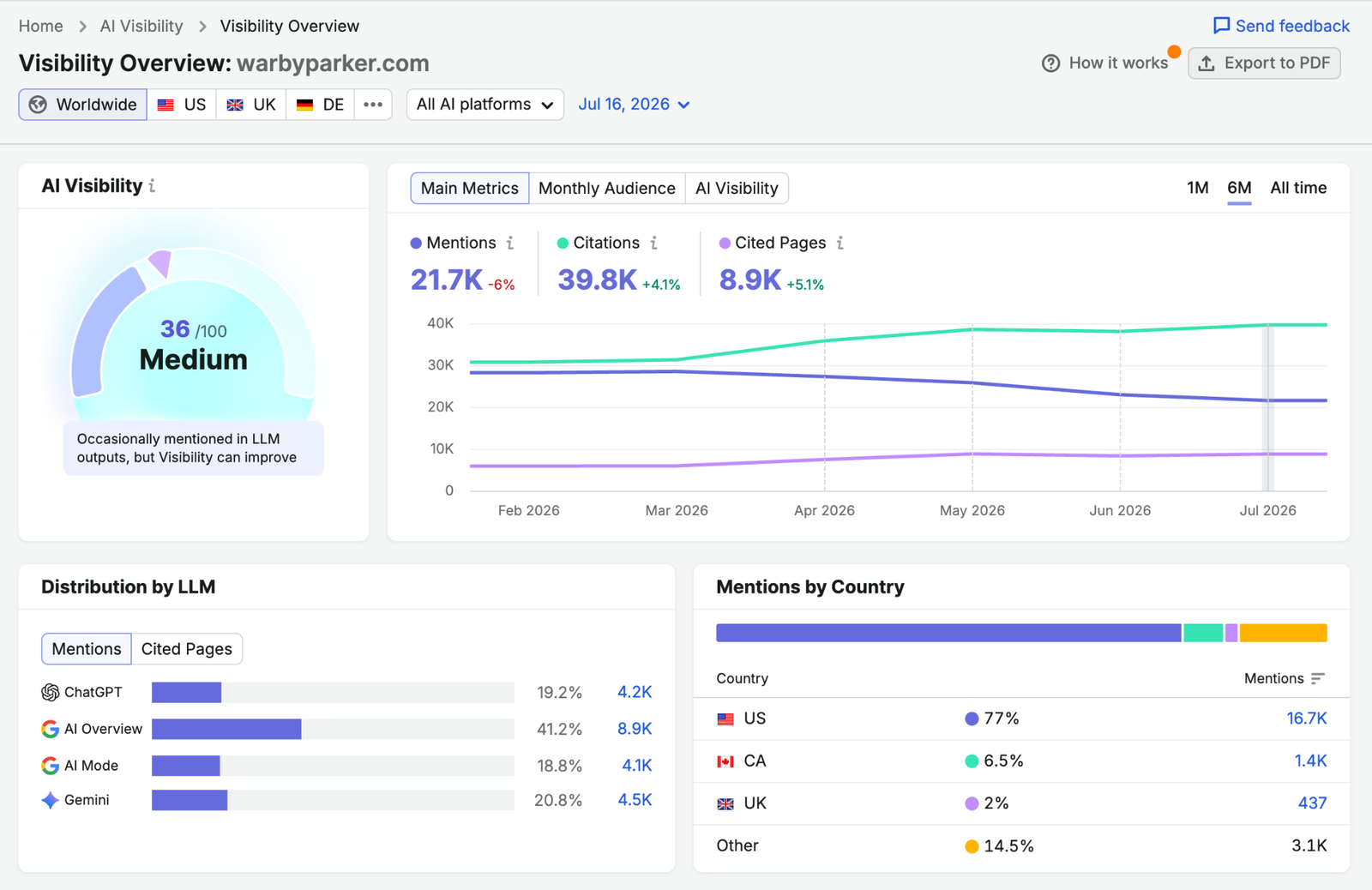
| Does my brand still appear in AI answers? | AI Visibility Toolkit | Monitor how my brand shows up in AI search and compare with competitors |
If you want to run these checks on your own WordPress site, get started with Semrush through my link.
What we know about the November 2026 core update
Here are the facts as of November 18, 2026:
- Start date: November 10, 2026 (around 10:06 a.m. Pacific time, according to the Google Search Status Dashboard).
- Scope: It applies globally and to all languages.
- Duration: Google says the rollout may take up to two weeks. The two earlier core updates this year each finished in roughly 12 days, so a finish around November 24 is plausible, but that is an estimate, not a promise.
- Type: Google calls it a regular update designed to surface relevant, satisfying content. It did not publish any guidance specific to this update.
- Context: It is the third core update of 2026, following March (March 27 to April 8) and May (May 21 to June 2).
The key point is that Google has not told us what changed. Anyone who claims to know exactly what this update "targets" is guessing from early data.
Rule 1: Don’t touch your site because of day-three rankings
Rankings move around during a rollout. A page that drops on day four can recover by day ten, and the reverse is also true. If you rewrite posts, delete content, or change your site structure mid-rollout, you will not be able to tell what caused what.
Google’s own advice is to wait until the rollout is finished, then wait at least a full week more before analyzing your data. So if the update completes around November 24, your real analysis window starts in the first days of December.
While you wait, the only things worth doing are fixing genuine technical problems and keeping a log.
Rule 2: Measure the right way
Most panic comes from comparing the wrong date ranges. Here is the method Google recommends, adapted for WordPress owners:
- Wait for the rollout to finish, plus one full week.
- In Google Search Console, open Performance and set a custom date range for that full week after the update.
- Compare it to the full week before the update began (the week ending November 9).
- Break the data down by Pages, Queries, Countries, and Devices. A sitewide average hides what is really happening.
- Look for patterns. Did one content type drop (for example, listicles, thin category pages, or older tutorials)? Or did a single topic cluster fall?
Third-party tracking tools can disagree with each other during an update, because each one samples keywords and locations differently. I never rely on one source. I check Search Console for what Google reports, then compare with a fixed keyword set in a rank tracker. If you want to know how far to trust those numbers, read my guide on how accurate rank tracking software is.
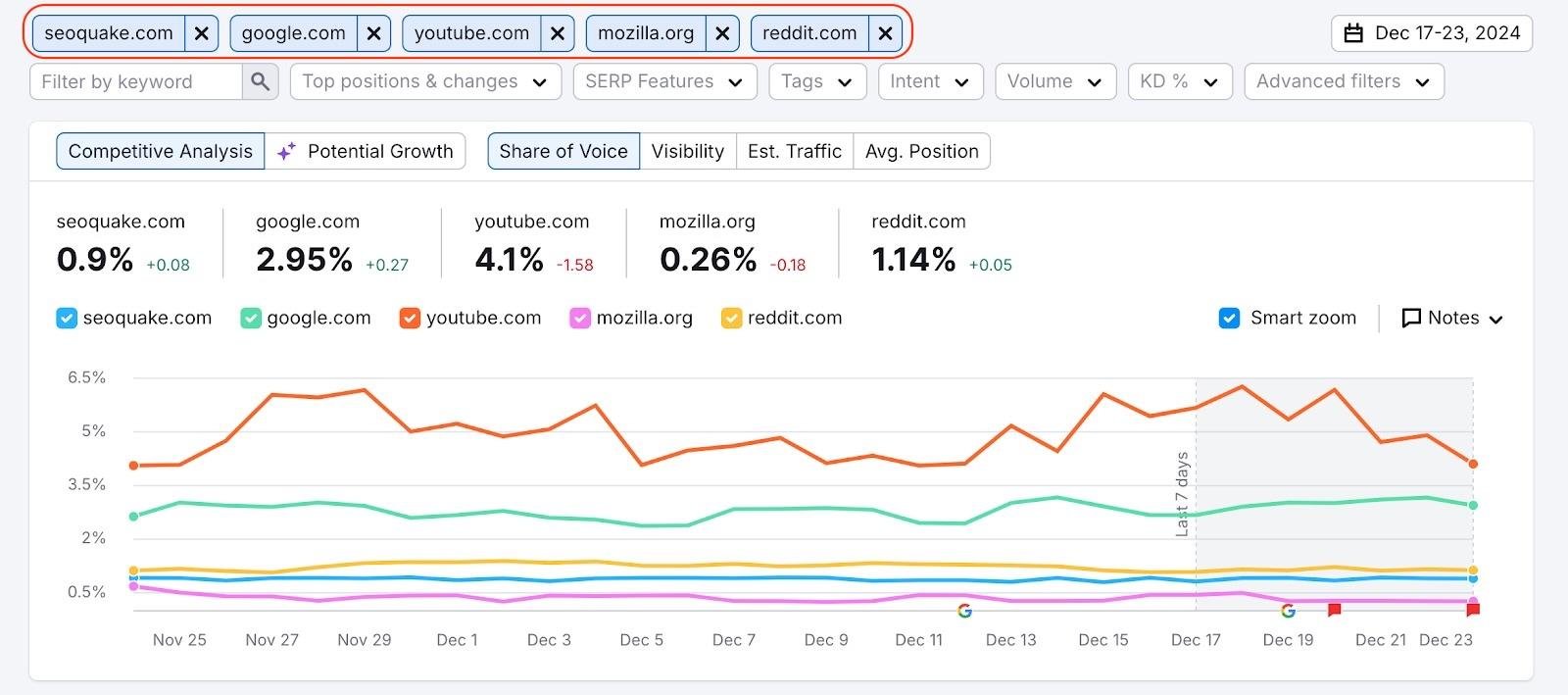
For that second view, I use the Position Tracking tool in the Semrush SEO Toolkit. It lets me monitor the same keywords daily by location and device, so I can see whether a drop is real or just noise. If you want to try it, you can start with Semrush Position Tracking here.
Step-by-step: diagnosing a traffic drop on WordPress
Once your comparison is ready and you see a real decline, work through these checks in order. Start with the boring stuff, because it is the most common cause.
1. Rule out technical issues. A surprising number of "core update drops" are actually WordPress mistakes. Check for an accidental sitewide noindex (Settings > Reading > "Discourage search engines"), plugin updates that changed your canonical tags, broken redirects after a theme change, and pages that now return errors. Running a full crawl with a tool like Site Audit in Semrush catches most of these in minutes.
2. Separate the core update from other updates. Google also ran a spam update in September that finished rolling out around October 8. If your traffic fell before November 10, look at the timing before blaming the core update. Remember that rankings can fluctuate without a Google update too.
3. Identify which pages lost. Export the page-level data from Search Console and sort by clicks lost. Ask honestly: is this page the best answer on the internet for that query? Or is it a thin rewrite of what already ranks?
4. Audit your weakest content types. On WordPress sites I often find the same problems:
- Tag and archive pages indexed with almost no unique content
- Dozens of near-duplicate posts targeting slight keyword variations
- Old tutorials with outdated screenshots and advice
- Mass-produced AI content published without human review or original input
- Affiliate-heavy posts with no real experience behind the recommendations
5. Compare against who replaced you. Search your lost queries and read the pages that now outrank you. Look for first-hand experience, original data, clearer structure, and a more complete answer. That gap is your to-do list.
What to do if your traffic dropped
Stay methodical and anchor your fixes in a clear SEO content strategy. Pick your top 10 to 20 lost pages and improve them one at a time:
- Add real, first-hand experience: your own screenshots, test results, case notes, or opinions.
- Merge overlapping posts into one stronger page and 301-redirect the old URLs.
- Remove or noindex pages that genuinely add nothing, such as empty tag archives.
- Update facts, dates, and tools, and show an honest "last updated" date.
- Add clear author information so readers know who is behind the content.
Expect this to take months, not days. Recovery after a core update is usually gradual, and it often becomes visible only after later updates. Do not expect a bounce the week after you publish improvements.
What to do if your traffic went up
Good news, but do not rush to "scale" what happened. Note which pages gained, which topics they cover, and what they have in common. Protect those pages: avoid big redesigns, keep them updated, and build on the same strengths in new content.
What to do if nothing changed
That is also a result. Use the quiet period to keep improving content quality and to fix any technical debt (a WordPress maintenance plan helps here), so you are in better shape for the next update.
My step-by-step Semrush workflow for this update
Here is the exact order I follow when a client asks, "Did the core update hit us?"
- Set up Position Tracking today. Create a project for your domain in the Semrush SEO Toolkit, add your 30 to 100 most important keywords, and choose the right location and device. This gives you a consistent data set that does not depend on how Google Search Console averages positions.
- Check Semrush Sensor. See whether SERP volatility is elevated in your niche. If everyone in your category is moving, your drop is part of a wider shake-up and not necessarily a problem unique to your site.
- Run a Site Audit. Crawl your WordPress site and fix technical issues first: accidental noindex tags, broken redirects, error pages, and indexable thin archives.
- Wait for the rollout to finish, plus one full week. Then compare the right periods in Search Console, as described above.
- Dig into Organic Research. Look at which keywords and pages lost positions, and compare your domain with the competitors that replaced you.
- Check your AI search visibility. Organic clicks are only part of the story now. Use the AI Visibility Toolkit to see whether your brand is still mentioned and cited in AI answers for your key topics.
- Review monthly, not daily. Keep your Position Tracking project running and judge your recovery over weeks, not hours. Here is my guide on how often you should check your rankings.
You can follow this entire workflow with a single Semrush account. Try Semrush through my link here.
Quick checklist
- ☐ Don’t edit pages in panic during the rollout
- ☐ Wait for the rollout to finish plus one full week
- ☐ Compare the same-length periods before and after in Search Console
- ☐ Segment by page, query, country, and device
- ☐ Cross-check with a rank tracker
- ☐ Rule out technical issues and the September spam update
- ☐ Improve the weakest pages with real experience and original value
- ☐ Track results monthly, not daily
Exclusive deal for new Semrush users
If you do not have a Semrush account yet, there is a current offer: save $120 on Semrush One Starter for 2 months. The deal is valid for new users only. Claim the Semrush deal here.
Final thoughts
Core updates are not penalties. They are re-evaluations of who deserves to rank, and the best response is boring and consistent: measure carefully, fix real problems, and publish content that is genuinely useful.
If you want data to back up your decisions instead of guessing, the Semrush SEO Toolkit gives you rank tracking, site audits, and competitor insights in one place. You can try it through my link here.
And if you want an expert to look at your WordPress site after the update settles, you can explore my WordPress SEO services or reach me at WPOptimizers.com.
